
The pages
Nearby
The places around you, nearest first, three to a page. Keep scrolling and it keeps finding places, farther and farther out.
The list
Each place has:
- its name on the first line (a place with no name of its own, such as a toilet or a tap, is called by its kind);
- on the second line, a cyan icon for its kind, the kind in words ("Park", "Toilet", "Tap water"), how far it is and which way.
The title says NEARBY in the colour of your GPS line (green, orange, red, or amber for the last known position, and grey when there is no position), with a small three-step GPS bar before it for a good enough fix.
The foot of the page says ENTER for more when there is more to look through.
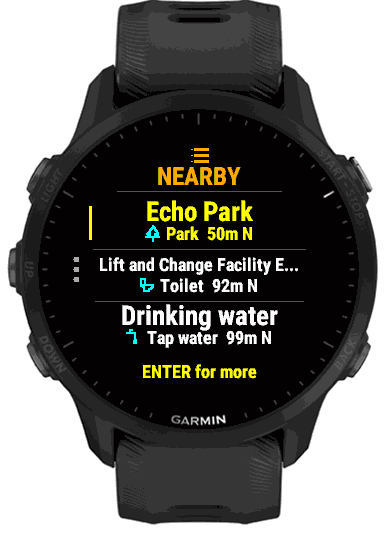
Scrolling through the list
Go into the list
On Nearby, press your watch’s select button when the footer says ENTER for more. One row is now lit: a yellow bar at its left, and its name and the line under it in yellow.
Move along it
DOWN and UP move the lit row. A step past the last row on the page turns to the next page, and a step past the first row goes back to the page before.
Open a place
START opens the lit place on a screen of its own. You can also tap a place to open it. BACK comes out of the list and returns to the three nearest.
The foot shows your page and a "+" while the list can still grow: "1/5+".
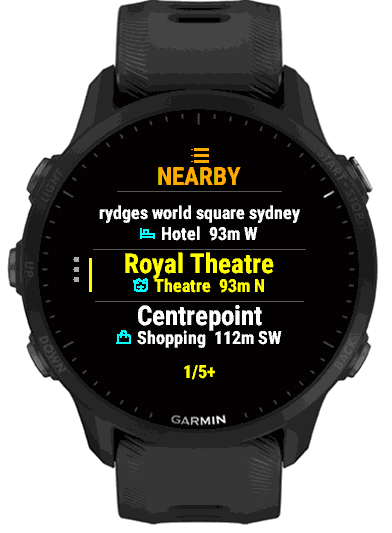
How far it goes
Nearby has no distance limit. Keep scrolling to browse every matching place in the database, nearest first. The watch may briefly show Searching wider... or Loading... as it finds more places.
After a long scroll, UP only goes back a few pages. Press BACK to return to the three nearest places.
Choosing what is in the list
The list shows the kinds of place you have ticked in Settings. With nothing ticked it shows every kind. When the choice leaves nothing nearby it says so; untick a group, or move.