
The pages
Radar
Every place within a circle round you, drawn on a plan that turns as you turn: what is ahead of you is at the top.
On the watch: Location > DOWN > DOWN
Reading the plan
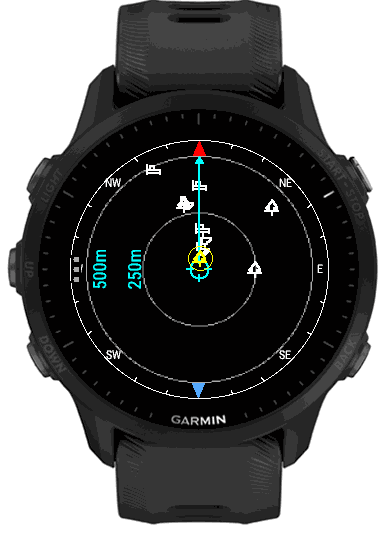
- You are the cyan crosshair in the middle.
- The plan turns with the watch's compass, so the way you face is always 12 o'clock. A cyan line runs from the middle to 12 o'clock: turn until it runs through a place and that place is straight ahead.
- A small red arrow on the rim is north. It goes round the rim as you turn, and is at 12 o'clock when you face north. With no compass reading the plan stays north-up and there is no line.
- Two circles: the outer one is the radius and the inner one is half of that. Their sizes are written in cyan along the left.
- Places are white dots, and the one closest to you is yellow. With 20 places or fewer in range, each is drawn as its icon instead of a dot.
The Radar uses the same Filter as the Nearby list.
How big the circle is
When you open the Radar it picks a radius that holds about 10 places: it starts at 50 m and widens (to 100 m, 150 m, and on up to 50 km) until 10 places are inside. Once you have zoomed yourself, it opens on the radius you last chose. If nothing is inside the circle, it zooms out until something is, and it does the same when you walk out of a circle that held places.
Zooming
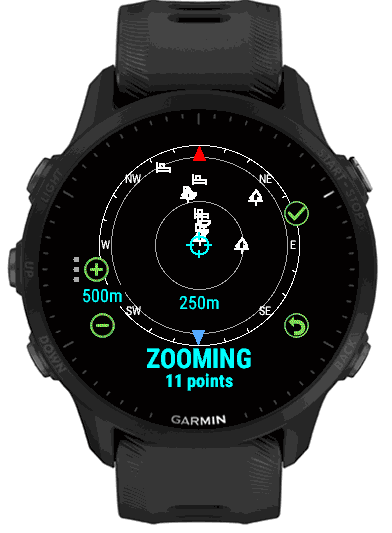
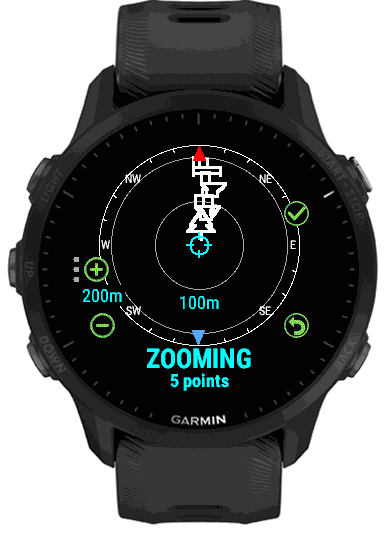
- START locks the page into zooming. The words ZOOMING and the number of places inside the circle ("11 points") show under the plan.
- UP zooms in and DOWN zooms out. The steps are 10 m, 20 m, 50 m, 100 m, 200 m, 500 m, 1 km, 2 km, 5 km, 10 km, 20 km and 50 km, and then every 50 km up to 500 km. The tiny circles are for the tap or the toilet block you are standing beside. A tap on the top half of the screen zooms in, and on the bottom half zooms out.
- You cannot zoom in to an empty circle, so the plan is never left blank. Every zoom shows all the places in its circle. Zooming out stops once the circle you are looking at has 100 places or more, because a plan with more dots than that is a blur: the circle that went past 100 is shown in full, and the next press says "Zoom stops at 100 places". You can always zoom in.
The little icons beside the buttons say what each one does: a green return arrow by BACK (it steps back) and a green tick by START (it goes on).
Stepping from place to place
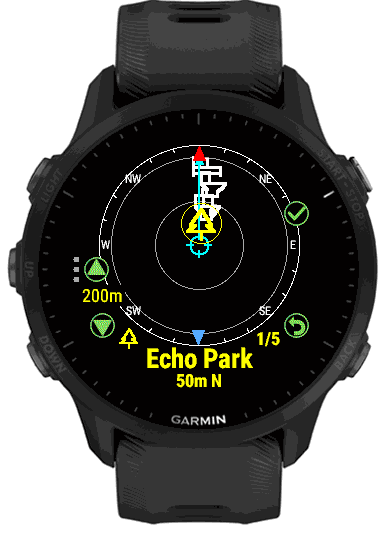
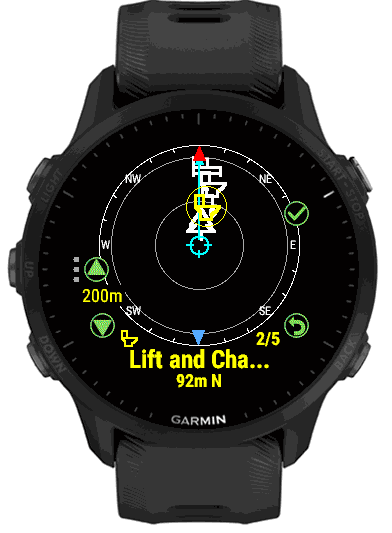
- DOWN picks the next place out and UP the one before. Both roll round: DOWN from the farthest goes back to the closest.
- The picked place is yellow, in a ring. Under the plan are its place in the order of distance ("2/5"), its name, and how far and which way.
- START once more opens the picked place on a screen of its own. In that screen UP and DOWN step through the places in the circle, nearest first, and BACK returns to the Radar in zooming, with the place it ended on picked.
- You can also tap a dot or an icon to open it.
- BACK goes back a step: from browsing to zooming, and from zooming out of the locked page, so that UP and DOWN move between pages again.
If the Radar says "Search incomplete"
A limit of the watch's memory. The watch has little memory, and the places in the very middle of a big city (the middle of Sydney or Melbourne, for example) are packed so closely that reading them needs almost all of it. In those few streets the Radar can say Search incomplete and show fewer places than there are, or none. It is not a fault with your watch. The Nearby list reads the same places another way and shows them.